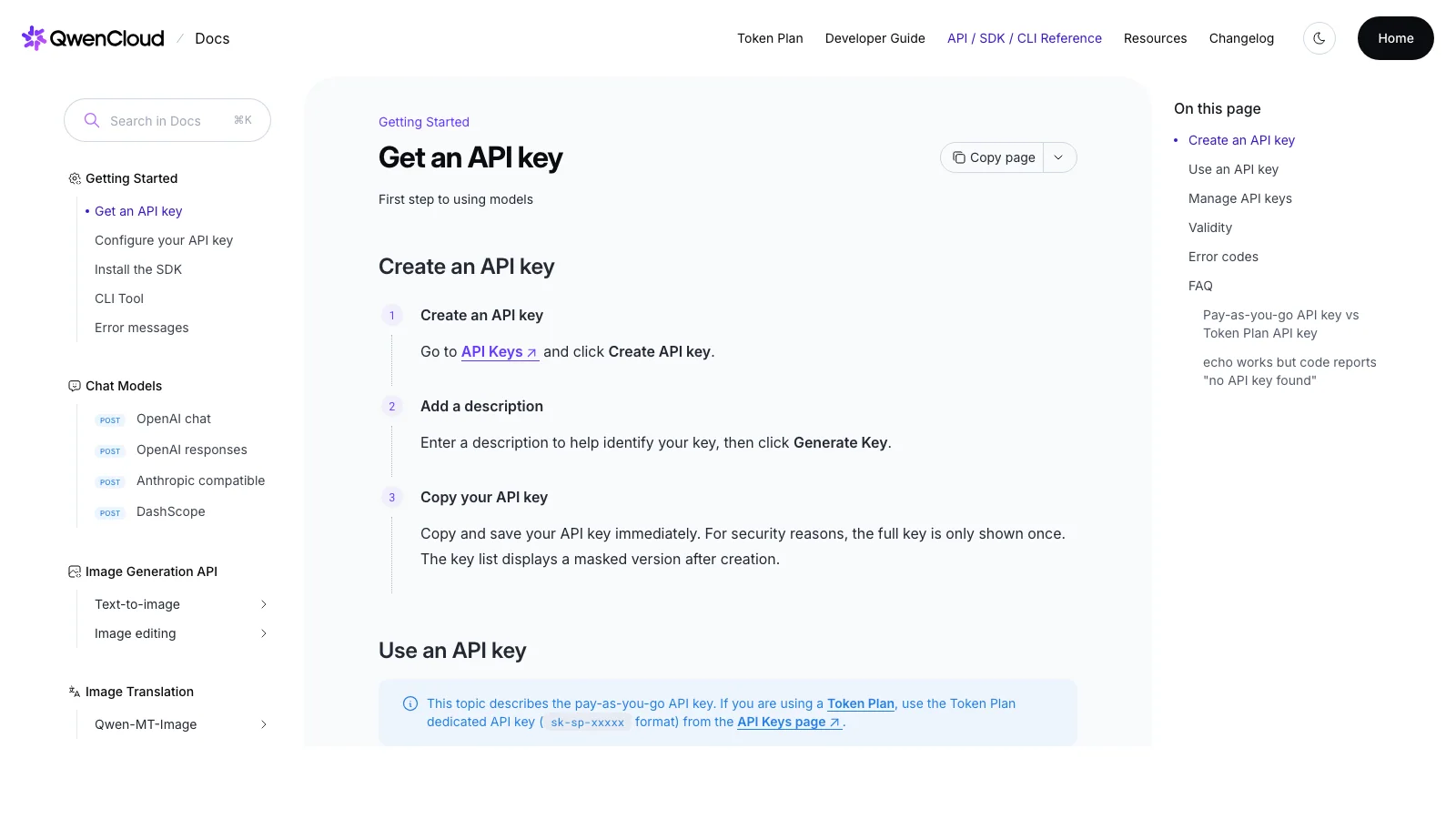
How do you access Qwen 3.6 Plus? Start in QwenCloud or Alibaba Cloud Model Studio, confirm that your account and region expose the exact model ID
qwen3.6-plus, create a scoped API key, use the endpoint shown for that key, and prove the connection with one small non-sensitive request. Do not copy a generic OpenAI endpoint or silently swap in a newer Qwen model just because it appears in a newer tutorial.
The cover shows QwenCloud's own API-key guide, not a decorative AI illustration. Its three visible steps—create, describe and copy—prove that access begins with an account-scoped credential. The image cannot prove that your account is eligible for Qwen 3.6 Plus, that a model ID is live in your region, or that the endpoint in somebody else's code belongs to your key.
How to access Qwen 3.6 Plus: verify the exact model before you write code
The deceptively hard part of this search is not sending a prompt. It is knowing what the name commits you to.
Qwen 3.6 Plus is still documented by Alibaba Cloud as a native vision-language Plus model. Its current alias is described as functionally equivalent to the dated snapshot qwen3.6-plus-2026-04-02. QwenCloud’s current model material also lists it with a 1M-token context window, image and video input, function calling, structured output and built-in tools. Those are useful capabilities, but they are not a universal promise that every account, region, SDK, billing setup or product surface will show the same choice.
That distinction is where most “it does not work” reports begin. A reader sees qwen3.6-plus in a model chart, inserts the string into copied code, and gets an authentication, endpoint or access error. The name was real; the route was wrong.
My rule is simple: treat a model name as a request to verify five linked things—account, region, key, endpoint and model ID. If any one is assumed rather than checked, the first call may be a misleading test of configuration rather than a test of the model.
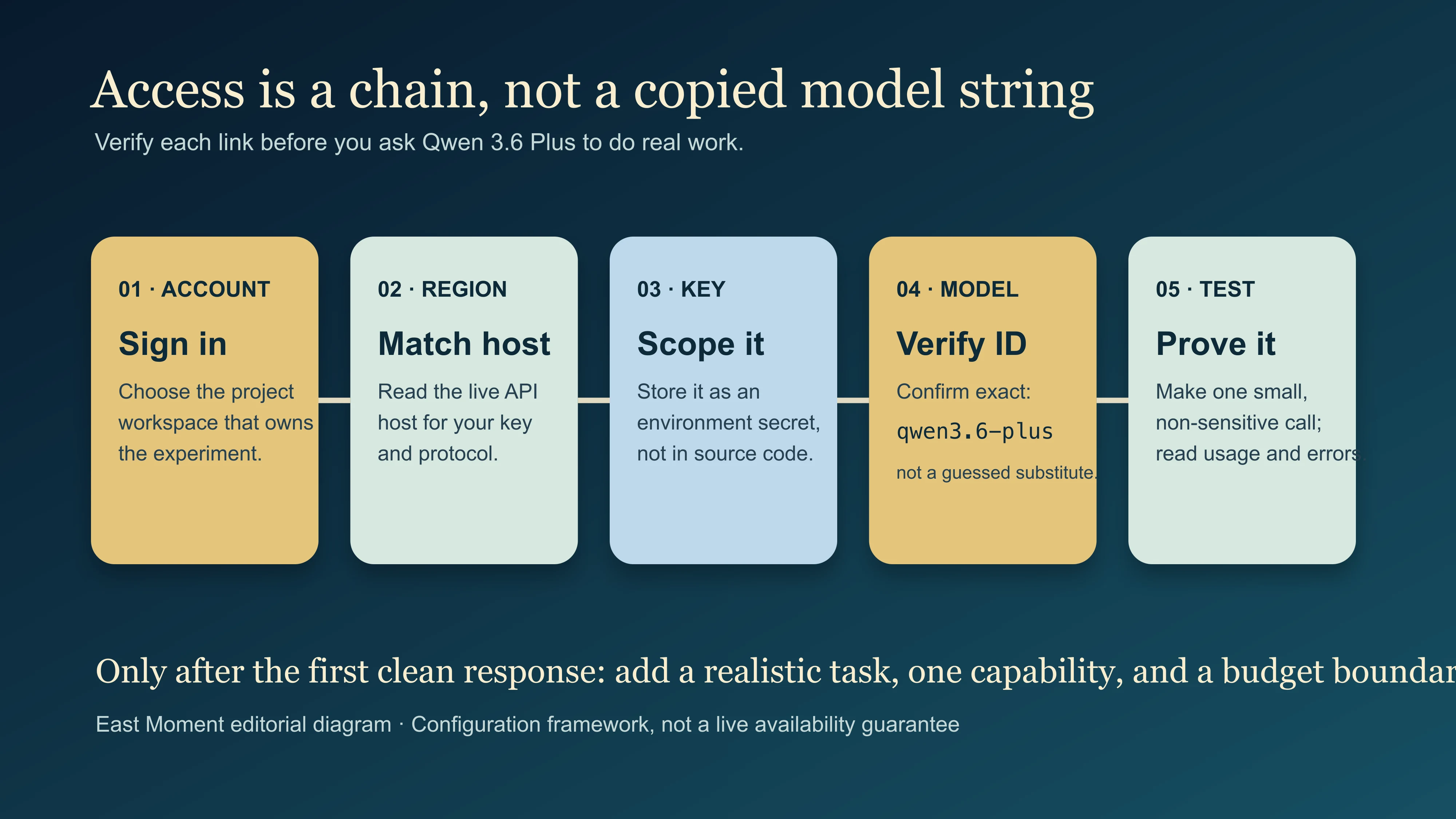
This is a verification sequence, not evidence that a live account is eligible today. Each stage must still be checked in the current official console and documentation before a real request is sent.
The direct route: QwenCloud or Model Studio, then a minimal call
For a developer outside China, the current international QwenCloud documentation is the cleanest starting point. For an Alibaba Cloud Model Studio account, the same discipline applies: use the live console’s API-host value and the documentation for the protocol you chose. QwenCloud’s API-key guide is explicit about a detail that generic examples often lose: a key alone is not enough. Your SDK also needs the service endpoint, and the endpoint changes by region and protocol.
Here is the smallest sequence that answers the search intent without turning the page into a pile of copy-paste folklore.
- Create or sign in to the QwenCloud / Model Studio account that will own the project.
- Open the current model list and confirm that
qwen3.6-plusis visible for your account. If you need repeatable behavior, note the dated snapshot too; QwenCloud treats the alias and snapshot as distinct quota entries. - Create an API key in the correct workspace. Copy it once, store it in a secret manager or local environment file that is not committed, and scope it to only the resources your experiment needs.
- Copy the API host from the key-creation flow or official region documentation. Do not borrow an endpoint from a post written for a different geography.
- Make one minimal text request with non-sensitive content. Save the request ID, model returned, status and token use. Only then add files, tools, web search, a repository or real customer material.
The official OpenAI-compatibility guide gives an international Chat Completions base URL of https://dashscope-intl.aliyuncs.com/compatible-mode/v1. That is useful for an international key and that protocol; it is not a magic string to transplant into every Qwen account. QwenCloud also documents a different base URL for some Responses and Conversations APIs. The right endpoint is the one the product documentation and your key’s region agree on.
The five checks that make an access guide trustworthy
| Check | What to confirm in the live product | What a successful check does not prove |
|---|---|---|
| Account | You can enter the relevant console and project/workspace | That a particular model is enabled for every account type |
| Region | The console and documentation identify the regional service host | That an endpoint for another region will accept the same key |
| Model | qwen3.6-plus appears as an available exact model ID |
That an alias will always point to the same dated snapshot |
| Key | The key is created in the intended workspace with an appropriate scope | That putting the key into client-side code is safe |
| Request | A minimal call returns a response and traceable usage/error information | That your future prompt, tool call or document workflow will work unchanged |
This table looks cautious because it is. AI access guides often call the fifth step “done.” In a real team, it is merely the moment when the useful questions begin: Is the response shape compatible with our parser? Does the model respect our language mix? How do we cap spend? Which tasks deserve a large context window? What happens when a tool call or a malformed file fails?
That is why I prefer a small, auditable first request to a grand demo. A first request should be boring enough that you can see the plumbing. Ask the model to return three plain bullet points about a non-sensitive topic. If that fails, you have a configuration problem. If it works, you have earned the right to test a real use case.
A minimal OpenAI-compatible example—without exposing the key
QwenCloud offers an OpenAI-compatible interface, so an existing OpenAI SDK project can usually change the key, base URL and model parameter rather than rewrite its entire client. This is a convenience layer, not proof of identical behavior: QwenCloud documents Qwen-specific controls such as enable_thinking, and it lists parameters that are ignored or behave differently.
import os
from openai import OpenAI

client = OpenAI(
    api_key=os.environ["DASHSCOPE_API_KEY"],
    base_url="https://dashscope-intl.aliyuncs.com/compatible-mode/v1",
)

result = client.chat.completions.create(
    model="qwen3.6-plus",
    messages=[
        {"role": "user", "content": "Return three plain facts about a sunflower."}
    ],
)

print(result.choices[0].message.content)
The code is deliberately small. It tells you whether the key, endpoint, package and model identifier can cooperate. It does not tell you whether your production agent should use thinking mode, whether a long context is affordable, whether a vision workload stays within its image limits, or whether an automated tool call fits your privacy rules.
Do not replace DASHSCOPE_API_KEY with a real key in a screenshot, a front-end bundle, a browser extension setting you do not understand, or a repository. Alibaba Cloud’s own API-key documentation recommends an environment variable specifically to avoid hard-coding. It also explains that newer keys may be shown in plaintext only once and that workspace permissions can constrain what a key can call. That is not administrative trivia; it is the difference between a contained experiment and an accidental shared credential.
Qwen 3.6 Plus is not the same decision as “use the newest Qwen”
At the time of review, QwenCloud’s general model guide recommends later Qwen 3.7 and 3.8 choices for many new workloads, while still documenting Qwen 3.6 Plus as an available model. This creates a genuine fork in the reader’s decision—not an error in the search query.
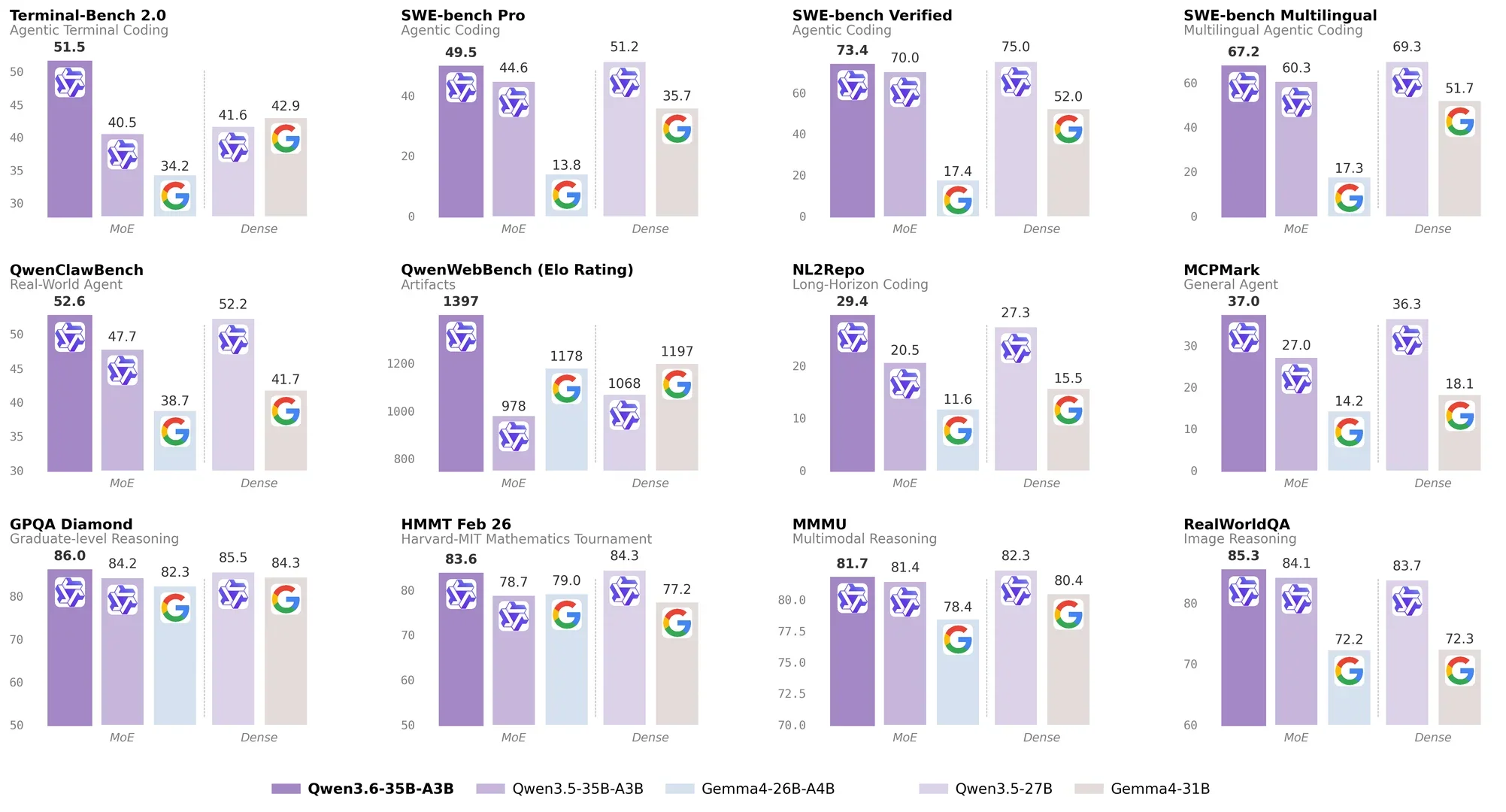
Look at the heading before looking at the bars. This official social card is for Qwen3.6-35B-A3B, not qwen3.6-plus. It is valuable here precisely because it proves how easily a family label can be mistaken for an exact product ID. The chart cannot establish Plus availability, price or superiority, so I will not use it for those claims. It earns its place by making the naming trap visible.
Choose Qwen 3.6 Plus when you have a compatibility, evaluation or product reason to test that exact ID: perhaps an existing configuration names it, a team wants to compare a dated baseline, or its documented multimodal and long-context properties fit an established experiment. Choose a later model only after checking the capability, price, output behavior and tool support you actually need. A newer label does not automatically make it the correct replacement for a workflow that depended on a particular output shape or budget.
This is the part of Chinese AI product coverage I find most useful: stop describing the market as a horse race and describe it as a set of operational choices. “Best” is too vague to configure. “Can this exact model, from this region, make this request within this cost and data boundary?” is a question an engineer can answer.
Start with one safe task, then make the test resemble your work
Once the connection works, expand in layers.
First: test the language and format. Give Qwen a short source passage in the language your team uses and ask for a compact answer with a format you can inspect. If your system expects JSON, test the documented structured-output route and validate it in your program; do not mistake a pretty JSON-looking reply for a contract.
Second: test a realistic but disposable task. A product team might classify ten synthetic support messages. A developer might ask for an explanation of a deliberately small function and run tests independently. A researcher might ask for a comparison of two public paragraphs while retaining the sources separately. The task should be close enough to expose useful failures but harmless enough to repeat.
Third: add one capability at a time. Qwen 3.6 Plus is documented as accepting image and video input and supporting function calling. Add an image only after text access is reliable. Add one tool only after the model’s ordinary response is observable. Add production data only after you have decided what leaves your system, what the provider stores, who can rotate the key and how an error becomes visible.

This test is more informative than “it feels smarter” because the failure is visible. The generated keyboard preserves the broad object, colors and some spatial relationships, yet individual keys, labels and geometry drift. That means the output may be useful for ideation while still failing as a faithful reconstruction. The same field comparison also found that Qwen 3.6 Plus could look stronger on a frontend or spatial task without uniformly beating the previous model on backend, vector-database or agent work. My conclusion is firm: choose the model by the task family, then validate the output at the level where a mistake would hurt.
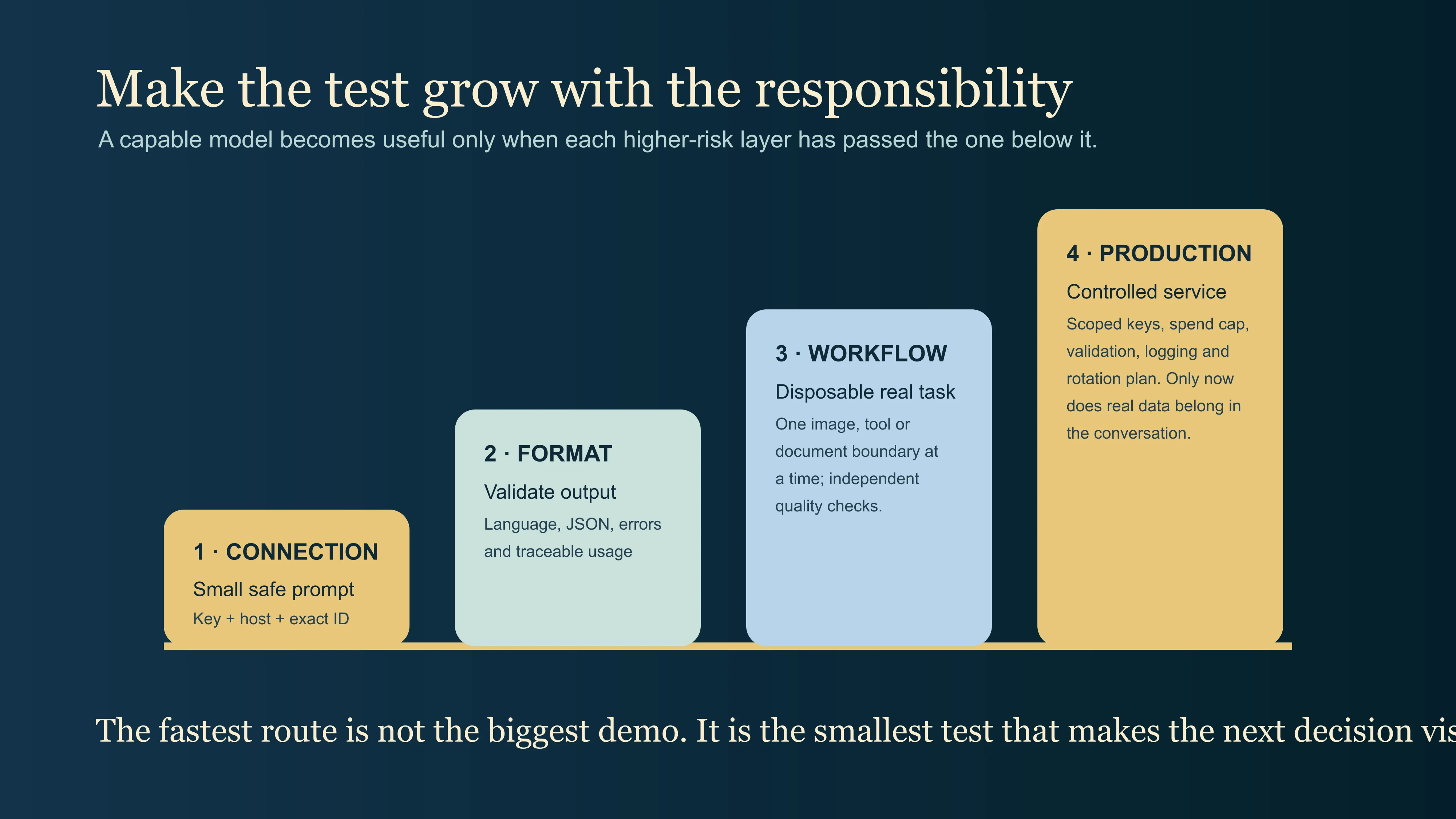
The diagram is intentionally a ladder rather than a feature list. Capability is not value until it survives a task, an error and a budget boundary.
The cost and quota mistake that catches otherwise careful teams
“Free” is a helpful way to start, not a deployment plan. QwenCloud says free quota is tracked separately by model; an alias such as qwen3.6-plus and a dated snapshot can each have separate quota. It also says built-in tool calls, batch calls, fine-tuning and deployment are not covered by that basic real-time-inference allowance. After the free quota runs out, account verification and the Free quota only setting determine whether calls stop or can move to pay-as-you-go billing.
That means the first operational control should be set before the first enthusiastic demo. If you are experimenting, enable the platform’s free-quota-only / auto-stop control where it is available, keep the test prompt short, and read the usage record after each kind of request. If you are building a service, set an application-side budget too: request size limits, concurrency limits, logging that excludes secrets, and alerts that notice a changed error rate or token profile.
The key is to separate two questions that marketing language tends to blend together:
| Question | The evidence you need |
|---|---|
| “Can I call Qwen 3.6 Plus today?” | Current console model availability, a correct regional endpoint and a successful small request |
| “Can I safely run my workflow on it?” | Cost controls, data review, output validation, failure handling and a test that resembles the real task |
The second is where a useful implementation begins.
What usually goes wrong—and the fastest way to diagnose it
The key works nowhere. Confirm it was copied completely, exported as an environment variable in the process that runs the code, and belongs to the intended workspace. Never paste it into an issue, prompt or public log while debugging.
The model name is rejected. Check the live model list and use the exact current ID. Do not guess whether a dated snapshot, latest alias or newer 3.7/3.8 name is interchangeable. The point of the Qwen 3.6 Plus page is precisely that model identity matters.
Authentication succeeds but the request fails. Inspect the service host and protocol. An OpenAI-compatible Chat Completions request and a Responses request can use different paths or base URLs. Match the client call to the official page for that API, not to a random snippet that happens to import the same SDK.
The output breaks a downstream parser. Compare QwenCloud’s compatibility notes with the OpenAI behavior your program assumed. The documented interface is compatible, but some parameters differ, and unsupported settings may be ignored. Build explicit validation and a safe fallback rather than trusting a model to preserve an invisible contract.
A prototype costs more than expected. Review model-specific quota, tool and batch charges, prompt size, output ceiling and concurrency. Then repeat the smallest test with tracing enabled. Cost surprises are easier to solve before an agent is allowed to retry itself fifty times.
Qwen 3.6 Plus FAQ
Is Qwen 3.6 Plus still available?
Current QwenCloud and Alibaba Cloud Model Studio documentation list qwen3.6-plus; Model Studio identifies its current alias as functionally equivalent to qwen3.6-plus-2026-04-02. Availability can still depend on the product surface, account and region, so confirm the live console before relying on it.
Do I need to use a new SDK?
Not necessarily. QwenCloud documents an OpenAI-compatible interface, so many projects can use an OpenAI SDK with the appropriate Qwen API key, base URL and model ID. Check its compatibility notes before assuming every OpenAI parameter or response behavior carries over unchanged.
Can I use the same key in every region?
Do not assume so. QwenCloud documents region-specific service hosts, and its documentation says the key’s API host is the base URL to use. Keep the key, region and endpoint as one configuration decision.
Should I choose the alias or the dated snapshot?
Use the alias when you want the provider’s current equivalent; use a dated snapshot when your team needs reproducibility and has verified that snapshot’s availability and cost. Treat them as separate choices, including for free-quota tracking.
The East Moment verdict: access is a chain, not a copied model string
The satisfying answer to this query is not “here is a secret endpoint.” It is a short chain you can verify yourself: the account sees the exact model, the regional key matches the endpoint, the smallest call works, and the cost/data boundary is visible before your useful work begins.
That is how I would approach a fast-moving China AI product: keep the technical detail close to the task and keep every dramatic claim on probation until the current official console and documentation agree. If a unified endpoint matters more than a direct provider relationship, continue with Qwen 3.6 Plus through OpenRouter and make the provider route visible instead of treating the router as a black box. For the wider landscape, explore the China technology hub, compare how another Chinese AI ecosystem handles shifting model names in Doubao Seed Code, or bring your real configuration question to Moments.